The 8W Game APK is the Android app for 8W.Game, a dark blue game platform made for players in Pakistan. It has Aviator, live games, cricket betting, slots and card games in one place. You sign up with a +92 phone number and play in Pakistani rupees (PKR). In this guide, we explain everything in short, simple words, so anyone can follow along.
Looking for more apps like this? Check our latest games list. You can also read our easy guides on the Player786 Game APK and the K116 Game APK.
Please note: 8W Game is a real-money game app. You can win money, but you can also lose it. It is only for people who are 18 years or older. Online betting may not be legal where you live, so please check your local laws first.

What Is 8W Game APK?
Think of the 8W Game APK as a game hall that lives in your phone. When you open it, you see many game tiles, like Aviator, Crazy Time and cricket. You put money in, you play, and if you win, you can take money out.
“APK” is just the name of an Android app file. Apps from the Google Play Store install by themselves. But 8W Game is not on the Play Store, so you get the APK file from its website and install it by hand. Don’t worry, we show you how below.
The app uses Pakistani rupees and works with EasyPaisa for cash outs. The logo shows a blue cricket ball and a gold crown, which tells you the app is made with cricket fans in mind.
8W Game APK Quick Facts
| App Name | 8W Game |
| Version | v1.9 (may change) |
| File Size | About 8 MB |
| Works On | Android phones |
| Currency | PKR (Pakistani rupees) |
| Sign Up | +92 phone number or Google |
| Cash Out | EasyPaisa (Rs 200 to Rs 50,000) |
| Age Limit | 18+ only |
| Price | Free to download |
What You See on the 8W Game Home Screen
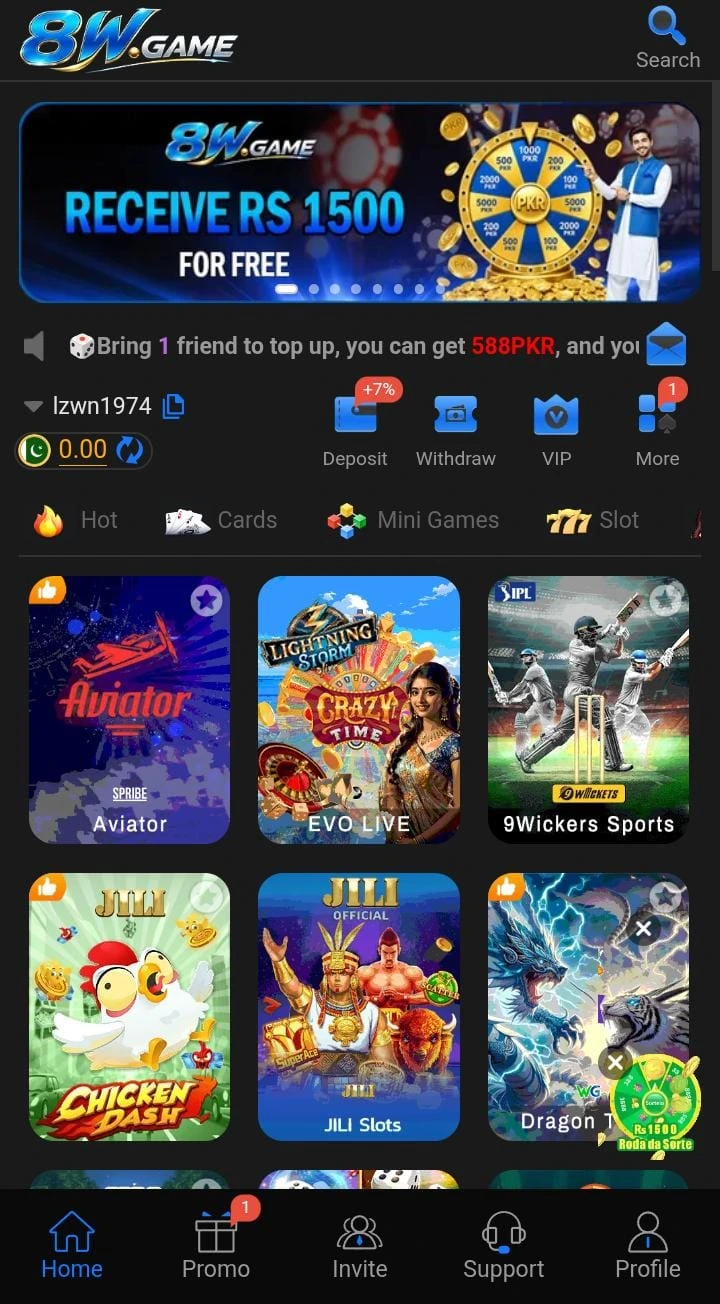
The home screen is easy to understand. Here is what each part does:
- Top banner: shows the latest offers, like a “Receive Rs 1500” spin wheel.
- News line: a moving text line. It talks about the invite reward, for example 588 PKR when a friend you invite adds money.
- Your balance: your user name and money left, with a small refresh button.
- Four big buttons: Deposit (add money), Withdraw (take money out), VIP (member levels) and More.
- Game tabs: Hot, Cards, Mini Games and Slot, so you can sort games by type.
- Bottom menu: Home, Promo, Invite, Support and Profile.
Games You Can Play on 8W Game
The 8W Game APK has many kinds of games. Each one plays a little differently, so here is a simple guide:
Aviator
A small plane flies up, and a number grows bigger and bigger. You must press “cash out” before the plane flies away. If you are late, you lose that round. It is fast and very easy to learn.
EVO Live and Crazy Time
These are live games with a real host on video. In Crazy Time, the host spins a big colorful wheel. You guess where it will stop.
9Wickets Sports (Cricket)
This is the sports section. You can guess the results of cricket matches, like IPL games. Cricket fans in Pakistan will find this part the most fun.
Slots and Mini Games
JILI Slots and Chicken Dash are simple tap-and-play games. Slots spin pictures, and you win when the same pictures line up.
Card Games and Dragon Tiger
Dragon Tiger is one of the easiest card games. Two cards are shown, one for Dragon and one for Tiger. You simply guess which card will be higher.
Tip: The sign-up page has a Demo button. Try the games in demo mode first, so you learn how they work without using real money.
How to Download 8W Game APK
Getting the app takes only a few minutes. Just follow these steps:
- Tap the green Download 8W Game APK button on this page.
- The official 8W.Game website will open in your browser.
- Find the download or “Android” button on that page and tap it.
- Wait for the file (about 8 MB) to finish downloading.
- If your phone shows a warning, tap “Download anyway”. This happens because the app is not from the Play Store.
How to Install 8W Game APK on Android
- Open your phone’s Settings.
- Go to Security or Apps, then find “Install unknown apps”.
- Choose your browser (like Chrome) and turn on “Allow from this source”.
- Open your Downloads folder and tap the 8W Game APK file.
- Tap Install and wait a few seconds.
- Tap Open. The 8W Game icon is now on your home screen.
Need more help with this setting? Android Central has a clear guide to installing apps from unknown sources. When you are done, you can turn the setting off again to keep your phone safe.
How to Register on 8W Game

Making an account is simple. You can sign up with a password or with a code sent to your phone:
- Open the app and tap Register.
- Type your phone number or a profile name in the first box.
- Pick Password registration and make a strong password. Type it again in the next box.
- Enter your phone number after +92.
- Keep the currency as PKR (Pakistani rupees). Be careful, because you cannot change it later.
- Tick the box that says you are over 18 and agree to the User Agreement.
- Tap the blue Register button. You can also sign up fast with the Google button.
Already have an account? Tap the Login tab, then enter your phone number and password.
How to Deposit and Withdraw Money
Adding Money (Deposit)
Tap the Deposit button on the home screen. Pick a payment method, type the amount and follow the steps on screen. Only add money you can afford to lose.
Taking Money Out (Withdraw)

- Tap Withdraw on the home screen.
- Open the Receiving account tab and add your EasyPaisa number.
- Go back to Request withdrawal and pick your EasyPaisa account.
- Type an amount between Rs 200 and Rs 50,000.
- Enter your 6-digit withdrawal password.
- Tap Confirm withdrawal. You can check progress in the Withdrawal records tab.
Important: The withdrawal page says you must finish all betting tasks before you can take money out. This means bonus money often has to be played many times first. Read the rules of every bonus before you accept it.
Bonuses and Rewards on 8W Game
From the screenshots, the 8W Game APK shows a few kinds of rewards:
- Rs 1500 banner: a spin wheel offer shown at the top of the home screen.
- Invite reward: the news line says you can get 588 PKR when a friend you invite adds money.
- VIP levels: a VIP button where regular players may get extra perks.
- Promo page: a Promo tab in the bottom menu lists current offers.
Bonuses sound exciting, but “free” money usually comes with rules. Always open the Promo page and read the terms first.
A Warning About the “Earn Interest” Button
The withdrawal page has a button called Earn interest with an “APR 100%” tag. That means it promises to double your money in one year. Real banks do not pay anything close to that. Very high promises like this are a warning sign. We suggest you do not keep money in the app for “interest”. Take your winnings out instead.
8W Game vs Player786 vs K116
Not sure which app to pick? This simple table compares 8W Game with two apps we reviewed recently:
| Feature | 8W Game | Player786 | K116 |
|---|---|---|---|
| Best for | Cricket and live games | Daily free gift | Aviator fans |
| Cash-out limit | Rs 200 – Rs 50,000 | Rs 200 – Rs 49,500 | Rs 100 – Rs 10,000 |
| Cash out with | EasyPaisa | EasyPaisa | EasyPaisa |
| Demo mode | Yes | — | Yes |
| Special reward | Invite bonus, VIP | Lucky Red Envelope | Demo play |
| On Play Store | No | No | No |
If you love cricket and live games, 8W Game gives you more choice. If you want a daily free gift or a simple Aviator app, read our K116 Game APK guide or our Player786 Game APK review to compare.
Is 8W Game Right for You?
Every app is good for some people and not for others. Use these two short lists to decide.
8W Game may suit you if:
- You are 18 or older, and real-money games are allowed where you live.
- You love cricket and want to follow matches like the IPL.
- You enjoy fast games such as Aviator or Dragon Tiger.
- You already use EasyPaisa and want quick cash outs.
- You like to practice first with a free Demo mode.
You should skip 8W Game if:
- You are under 18 years old.
- You need the money for food, bills, school fees or rent.
- You get upset easily when you lose.
- You only want apps checked by the Google Play Store.
Smart Tips for New Players
- Try the Demo first. Learn the rules for free before you spend a single rupee.
- Start small. Make a small first deposit, like Rs 200, and test a withdrawal.
- Read bonus rules. Check how many betting tasks a bonus needs before you accept it.
- Save your passwords. Write your login and withdrawal passwords in a safe place.
- Check your records. Look at the Withdrawal records tab to see every cash out.
- Use official help only. Contact staff only through the Support button inside the app.
Pros and Cons of 8W Game APK
Pros
- Small file, about 8 MB
- Cricket betting with 9Wickets Sports
- Live games with a real host
- Free Demo mode to practice
- EasyPaisa cash outs up to Rs 50,000
- Extra withdrawal password for safety
- Quick sign-up with phone or Google
Cons
- Not on the Google Play Store
- Betting tasks must be finished before cash out
- “100% interest” offer is a red flag
- Currency cannot be changed after sign-up
- You can lose real money
- Adults 18+ only
What Your Phone Needs
The app is small, so most phones can run it. These are our simple suggestions for smooth play:
- An Android phone with Android 5.0 or newer.
- At least 100 MB of free space for the app and its game files.
- 2 GB of RAM or more for smooth play.
- A stable internet connection (Wi-Fi or mobile data).
Is 8W Game APK Safe?
The app file comes from the official 8W.Game website, not from the Play Store. That means Google has not checked it. Here is how to stay safe:
- Download only from the official link on this page, never from random groups or messages.
- Keep Google Play Protect turned on. It scans apps for harmful code.
- Use a password you do not use anywhere else.
- Never share your withdrawal password or OTP code with anyone, even “support” staff.
- Start with a small deposit and test one withdrawal first.
Remember: a safe app is not the same as a safe bet. Even a working app can make you lose money quickly.
Common Problems and Easy Fixes
The App Will Not Install
Turn on “Install unknown apps” for your browser. Also make sure you have enough free space. If the file is broken, delete it and download it again.
The App Does Not Open
Restart your phone. Then clear the app’s cache in Settings, Apps, 8W Game, Storage.
I Cannot Log In
Check that you typed the correct number after +92. If you forgot your password, use Code register or tap Customer Service on the login page.
My Withdrawal Is Stuck
Check that your amount is between Rs 200 and Rs 50,000. Make sure your betting tasks are done and your EasyPaisa number is correct. Then contact Support from the bottom menu.
How to Update 8W Game APK
Apps from outside the Play Store do not update by themselves. When the app asks you to update, or every few weeks, come back to this page. Tap the download button, get the new file and install it over the old one. Your account and balance stay safe, because they are saved online.
Play Smart: Simple Money Rules
Games like these are made so the house wins more often over time. Follow these easy rules:
- Set a money limit before you start, and stop when you reach it.
- Set a time limit too, like 30 minutes.
- Never borrow money to play.
- Never try to “win back” money you lost.
- Take a break if playing makes you feel worried or angry.
If you feel playing is becoming a problem, free help and tips are available at BeGambleAware. Talking to family or a friend also helps a lot.
Frequently Asked Questions
What is 8W Game APK?
It is the Android app for 8W.Game. It lets you play Aviator, live games, cricket betting, slots and card games using Pakistani rupees.
Is 8W Game APK free?
Yes. The app is free to download. You only spend money if you choose to deposit and play.
What is the latest 8W Game version?
The version we found is v1.9, and the file is about 8 MB. This can change when the app gets an update.
Is 8W Game on the Google Play Store?
No. You download the APK from the official 8W.Game website using the button on this page.
How do I withdraw money from 8W Game?
Add your EasyPaisa number in Receiving account, then request between Rs 200 and Rs 50,000 and enter your withdrawal password.
Why can I not withdraw my money?
The app says you must finish all betting tasks first. Also check your amount, your EasyPaisa number and your withdrawal password.
Can I play 8W Game without money?
Yes. Use the Demo button on the sign-up page to try games for free.
Is 8W Game for children?
No. You must be 18 years or older to use 8W Game.
Final Verdict
The 8W Game APK is a small, easy app with lots of choice. Cricket fans will like 9Wickets Sports, and the Demo mode is great for learning. EasyPaisa cash outs up to Rs 50,000 are also handy. But remember the betting-task rule and stay away from the “100% interest” offer. Play only with money you can afford to lose.
Want to compare before you choose? Read our simple guides on the Player786 Game APK and the K116 Game APK, or browse all our latest games.
Disclaimer: APKSurii is not the owner or developer of 8W Game. This guide is for information only. Screenshots were taken from the app for this review. Real-money games carry risk and are only for adults aged 18+. Please follow the laws of your country.
Leave a Comment